Croakwood Devlog #9 - Object Placement Tools

In preparation for Game Garden and in the time afterwards we've spent some time on polishing how placing objects works.

Placing objects is one of the main things you do in this game of course, so it needs to feel good and be intuitively understandable.
There's a few considerations we have to make for these tools. There are some restrictions we need to make simply due to how the game works, but generally we want to give players a lot of freedom so they can design their town however they want. At the same time we want everything to feel playful and easy to understand, and not like you're using some sort of 3D modeling software.
How fast you're able to get to a good looking result is also a very important consideration. We want players to be able to design a full house within a few minutes.

One basic tool that helps with this allows you to quickly duplicate any existing object:

Oftentimes this makes it unnecessary to search through the menus for the object that you're looking for, so this already speeds up building a lot.

Sometimes you just want to move an object. You could use the duplication tool to create a new object, then delete the old one... but simply picking up the object and moving it feels much nicer and better :)

And of course sometimes you just want to be able to go back a few steps, so there's undo.

Undo is one of the most-requested features for Parkitect. Unfortunately it's not something that can be added easily into a game that wasn't designed with undo in mind.
For Croakwood we knew that people would really want to have this, so we made sure to add support for this very early on.

We differentiate between two different types of objects, decorations and furniture.
Decorations are objects like plants, vases or crates and we allow players to place them very freely. They aren't locked to any grid and don't have any collision, so you can use them in a lot of creative ways.
Decorations can be rotated quite freely.

Furniture are objects that the villagers need to interact with, like chairs, tables or beds. Due to technical reasons furniture had to be locked to a grid and to 90° rotations so far.

Another nice side-effect is that this made furniture placement pretty quick due to the limited options, and we liked that figuring out how to fit all the required furniture into a house felt a bit like a small puzzle game.
Due to improvements we made to villager movement this year the technical limitations that required furniture to be on a grid do not exist anymore and we wondered... would it hurt to give a bit more freedom?

After giving it a try it's working quite well - the furniture still collides so your space is still limited, and the added freedom gives you more options for decorating the houses without adding significant complications. So we're keeping it like this for now :)

For some objects you can drag to create multiple of them in a row, and they can snap together automatically:

One case where it's not very fun to build something out of many individual tiles are roofs. They can have fairly complex shapes and there's a large number of pieces.

Having to piece these back together isn't very fun, so instead there's a tool that does it for you.
Getting this to work well took quite some time but it's pretty good finally :)

Vancouver Game Garden Recap

It’s been quite a few years for most of the members of our team since we last attended a convention, especially as exhibitors. As mentioned in the previous post, a few weeks ago we had the pleasure of running a booth at a local event (for our two Canadians), Vancouver Game Garden, and we had a fantastic time!

The team has been quite eager to put a Croakwood demo into the hands of the public, get some direct feedback, and just generally experience what reactions to the game in action would be like. For the months leading up to the event, we spent quite a bit of time focusing on completely overhauling the placeholder UI that we’d been using throughout development. This was also something we felt we needed to do before attempting to demo the game publicly.

With our recent work on UI and a few other key features fresh in our minds, we decided on bringing a build that focused primarily on the creative town building aspects of Croakwood; a very important piece of the game that we are keen to have feeling fun and intuitive. We also implemented an extremely early version of what fulfilling a specific request from a frog villager might look like, just to add some optional guidance in lieu of a tutorial for now. For the setting, we provided a cozy pre-built town that could be freely decorated and added to. The resource and production chains needed were already set up and in motion so as to not take focus away from exploring the creative systems or simply observing life in the day of a frog.

For both days of Vancouver Game Garden, we had an incredible volume of people stop by to try out the demo or learn more about Croakwood. We had Parkitect veterans, Croakwood wishlisters, frog appreciators, cozy gamers, people who don’t usually play games, not-so-cozy gamers, and even folks who travelled quite a distance to attend just because of Croakwood! We even got a chance to finally have some of our peers in the local game development scene sit down and try the game. We were floored by the positive reactions, rapidly ran out of stickers, encountered some weird bugs, took a ton of notes, and at the end of it all came away with a LOT of valuable feedback, suggestions, and ideas. Hopefully we’ll be able to expand on some of those learnings in future posts!

The table for our booth ended up being larger than we had accounted for, so we utilized some of the extra space by putting out a large paper sheet, some art supplies, and encouraged passerbys to draw a frog, and wow! The folks at the event delivered and then some - we ended up with four full sheets of incredible frog art.

For those unable to attend, we’ve recorded some footage from the demo to share here as well!

To everyone who attended and came by the Croakwood booth - thank you so much! All of the compliments, smiles, and excitement we got to experience has been passed along to the whole team. Whether exhibiting or not, we are very much looking forward to the next Vancouver Game Garden!

FAQ

There are some questions that have been asked a few times recently, so we'd like to answer them :)

Are you releasing this demo for everyone to play (for example on Steam)?

A demo for an event is a bit different from a demo that you can play at home.
At this event, people only had about 10-15 minutes to check out the game, so the demo has a very limited amount of content and is focused on letting people see and achieve something quickly.
At home you surely want to spend more time with it, so we'd like to have more content ready first before doing a demo on Steam!

We will eventually have a few ways for people to get early versions of the game before the real launch.
We'll do one or multiple playtests on Steam that will be available to a limited number of people who want to help us test the game and provide feedback, and later towards the release of the game there'll be a demo that everyone can access.

If you want to help with testing the game before release you can register for it now on Steam.

Once we have a test version ready, a limited number of people will be chosen randomly.
We'll post about it once the test starts, and if you've been selected you'll receive an email from Steam.

Are you going to demo the game at other events?

Maybe! We think there's a good chance, but we don't know yet when or where. Once we do we'll post about it here.
Since a lot of our team is based in Canada and Germany that'd be the most likely event locations.

What's the overall development state of the game currently?

We're really happy with how it's progressing, it's just taking time to get everything done (a bit more time than we expected to be honest! Which is not unusual for game development...).
The house building and decorating portion of the game is in really good shape. The villagers generally work really well, they're able to navigate the town and interact with it without any issues.
A lot of work this year went into the UI design and structure and that's in really good shape now too.
Of course there's always more to add and improve for everything, but generally we're happy with the state of these parts now.
Our main remaining work until release will be focused on adding more gameplay content (for example giving the villagers more activities to do; making sure the villagers react in more ways to the town; making sure players have goals to work towards).
Oftentimes with big projects like these there's a long phase of experimentation and figuring out what the game is going to be, and it's not totally clear what's still missing and how all of the ideas are going to fit together.
We think we're beyond that phase since some time and have a good understanding now of what we still need to get done to be able to release the game - it "just" needs to be done now :)

Croakwood at Vancouver Game Garden

We're bringing a first demo of Croakwood to Vancouver Game Garden on September 27-28, alongside many other great games from local independent developers.

If you happen to be in Vancouver we'd be excited if you come and give it a try!
The demo encompasses a slice of roughly the first hour of gameplay with a focus on town building mechanics.

The event location is the Roundhouse Community Centre at 181 Roundhouse Mews in Vancouver.
Entrance is on September 27 and 28 from 11am to 5pm and is completely free.

It's the first time we're showing the game in public, so it'll be very interesting to see what kind of feedback we receive and what works well and what doesn't :)

Croakwood Devlog #8 - Movement

When we started working on Croakwood, programming the villagers seemed to be relatively straightforward - they just have to walk around in whatever environment the player created for them and interact with certain objects. In that sense they are very similar to the guests in Parkitect and so we thought we could easily apply most of what we had learnt there to Croakwood.

This was sort of true, but when we got to the details it turned out to not be quite that easy!

It's a fairly big topic so I've split it into two posts; this one is about movement and the next one will be about interactions with objects.

The first problem we had to solve was the pathfinding, so figuring out which route the villagers should take to get to their destination (ideally taking more or less the shortest possible path).
Initially we thought that, much like the guests in Parkitect, the villagers would mostly stay on the paths that the player builds, so we'd only have to navigate along those paths.
We started with the A* algorithm because it's easy to implement and makes sense to use for a grid-based game.
As a small improvement over Parkitect we allowed the villagers to walk diagonally as well, which helped a lot with making their movement look a bit more natural.

We built some tools to place markers on objects that define where the villagers can't walk through, e.g. the orange box on this shelf is non-walkable:

This worked alright. As towns grew we were looking for some performance improvements and eventually implemented Jump Point Search and that's what has been used in the game until earlier this year.

Here's how it all looked in motion:

This is an old recording, there's a bunch of things wrong with the movement here that we don't like.
Notice how sometimes villagers clip through decoration objects or other villagers, how they bump into each other and how jerky their movement is when trying to walk around each other.
The rest of the post explains how we addressed these problems.

Eventually though it became clear that switching to a different pathfinding system would benefit the game a lot because there were situations that we couldn't handle well otherwise. As the game continued developing, our initial assumption that the villagers would stay on the paths most of the time turned out to be wrong. There are a few professions like the forester and woodcutter who need to go off-path to plant and harvest trees, and sometimes villagers need to travel across the terrain for long distances.
This is pretty bad for simple A*, since it might have to search through large parts of the world to find a path, which can take a long time.

The other problem is that our pathfinding obstacles were oftentimes simply not detailed enough.
For example in the building from the earlier video there's some barrels and crates on the floor:

We think this kind of clutter is important for the look of the game, so removing it is not an option. We could simply let the villagers walk through the clutter as if its not there at all (like in the video at the start of the post), but that doesn't look very nice and we also think it breaks the players immersion and simply doesn't feel very nice (what's the point of nicely decorating a house if the villagers ignore the existence of the decoration?).

Ideally, we want the villagers to be able to navigate around the clutter, but our obstacle system only allowed to mark fairly large grid cells as non-walkable. This is problematic for small objects:

The collision box is blocking a lot of empty looking space around the object, and if the villagers can't walk in areas that look empty that's very confusing for players.
We could make the grid cells smaller to improve this, but that would increase pathfinding costs further and would make manually marking blocked cells require more time as well. It wouldn't scale well with the system we had.

So, we had to look for a different approach that could calculate more detailed paths, require less manual work, and have better performance, especially for long distances.

A very common solution that fits these requirements quite well are navmeshes.
They are a pretty nice general solution that you can pretty much put into any 3D game and get decent results.
So we gave them a try in a test project - here's a debug view showing the surfaces it found that the villagers can walk on as a blue overlay:

It looked promising! However, after testing this for a few days we came to the conclusion that this was not the best solution for our game. We might have been able to make it work, but it would always have been a suboptimal compromise.

One problem is that calculating and updating the navmesh can be quite slow, which is bad in a game where players frequently place and remove obstacles.
The other problem is that it's kind of hard to control the shape of the mesh - you never really know what you'll get,
You can work around that in a game where all the levels are pre-designed by manually fixing the problematic spots, but in a game that's entirely user-generated content that doesn't work.

So we continued looking for something that would give us similarly good results as navmeshes without their downsides.
Eventually we found Hieararchical A* (here's also some good articles about the implementation in Red Alert 3 and Factorio).

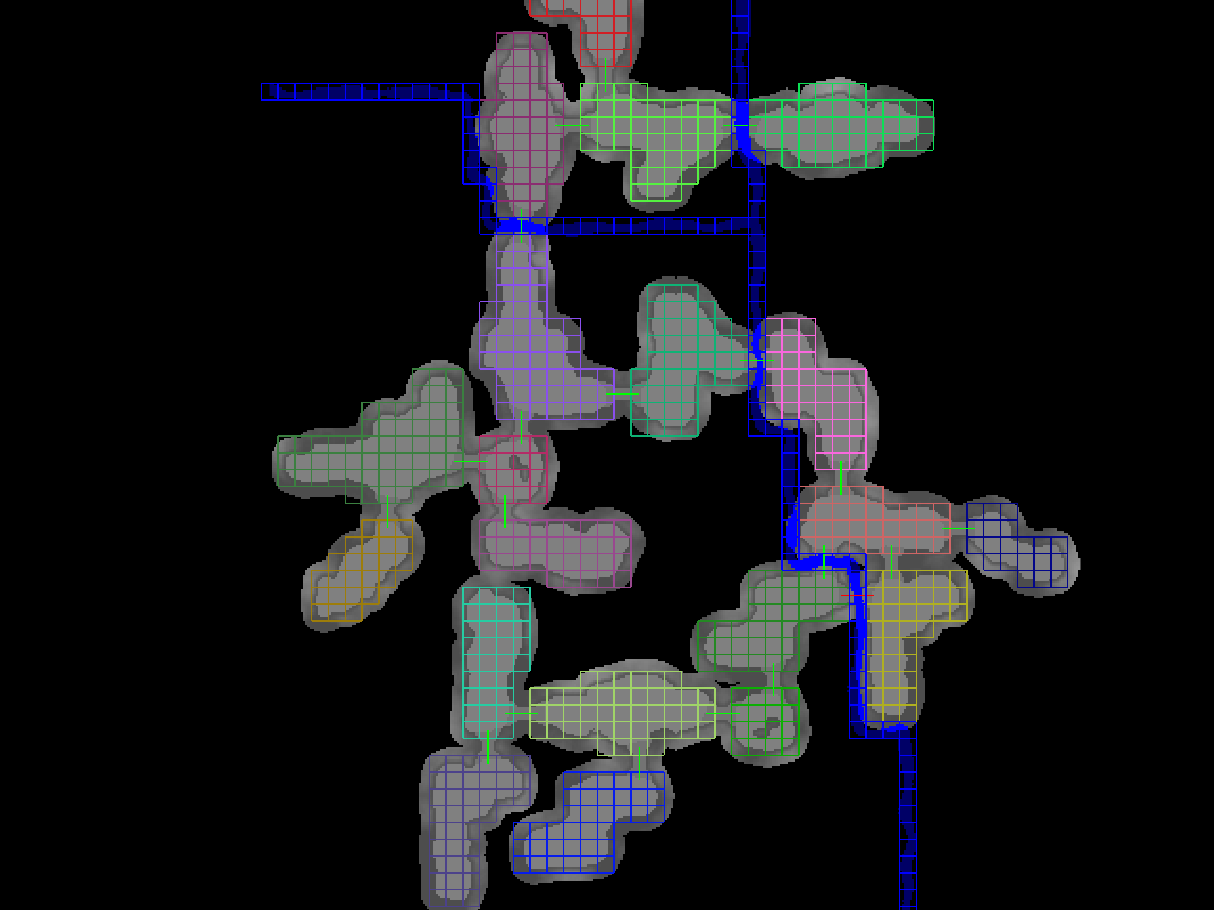
It is a grid-based system where the core idea is that instead of having to search through all of the tiny cells you combine them into way fewer clusters of bigger cells, then search through those first to figure out which of the tiny cells have a chance to be a part of the path at all. Then to get the detailed path you search through the tiny cells belonging to the big clusters along the path you found. If your world is really big it might make sense to have multiple levels of this, e.g. combining the clusters into even bigger clusters that you search through first (the Factorio blog post does a much better job explaining this and has some nice visualizations, check it out!).

This turned out to work really well and perfectly matched all of our requirements!

Instead of using giant voxels to mark areas as non-walkable, we switched to using polygons that can match the shape of our objects much more closely. To reduce the amount of manual work required we created tools that automatically generate these polygons; we only had to manually adjust them for a handful of objects.

When a player places an object, we rasterize the obstacle polygons to figure out which grid cells it blocks (so we still navigate through a grid, but the cells are much smaller now). Here's a debug view highlighting locations where the villagers can't walk in red:

(A nice side-effect of using polygons is that it's easy to arbitrarily rotate and scale them, which means in the future we should be able to allow scaling deco objects and rotating them more freely than currently possible)

Unlike our initial system the hierarchical pathfinding is able to quickly find long paths across the terrain. Here's a debug view with a labyrinth test map:

One last puzzle piece to make the villagers move nicely is the steering. We want them to walk smoothly around each other. They should recognize that they are going to bump into someone quite some time before it happens, and then adjust their trajectory to prevent the collision.
There's an algorithm called RVO2 that handles this very well, so that's what we're using. One benefit of our obstacle polygons is that we can also feed them into RVO2, so our villagers are able to also smoothly steer around any static objects.

Finally, here's the initial scene from this blog post with all of the improvements in place:

No more clipping through decorations or other frogs when it can be avoided, no more awkwardly bumping into each other, and much more natural looking movement.
We're pretty happy with this :)